

How to discover hidden failure patterns in your AI agent's production traffic (2026)
Scorers, threshold alerts, and dashboards catch only the AI agent failures that teams define before release. Undetected failure modes can continue running in production when no scorer or alert checks for behaviors such as stale retrieved context, repeated tool retries, unsupported confident answers, or unresolved user requests.
This guide explains how to discover hidden failure patterns by clustering production traces by agent behavior, investigating unusual clusters, and turning confirmed failures into scorers, evaluation datasets, and review workflows. Braintrust Topics runs clustering across production traces, so newly discovered failure modes can become enforceable checks in the same observability and evaluation workflow.
Spot the gaps in agent observability
Consider an agent that has been live for a few weeks. The team added a hallucination scorer to catch unsupported answers and a latency alert to flag slow responses. Then a customer reports that the agent quoted a price that was three weeks out of date. The retrieval index had fallen behind a pricing update, so the agent answered with full confidence from stale context. The answer was fluent, fast, and wrong in a way none of the existing checks were designed to catch.
The stale-pricing failure was present in production traces, but the issue did not appear on the dashboard because no scorer described stale retrieved context, and no alert measured pricing accuracy against the latest source of truth.
Most agent observability setups stop at tracking known failure modes. They rely on specifying expected failures in advance. Spotting hidden failure patterns in production requires a more holistic view across many traces.
Why scorers and dashboards miss failures
Scorers and alerts work when a failure has a clear definition. A hallucination scorer can catch unsupported claims, and a latency alert can catch slow responses, but both checks depend on a failure shape that the team already knows how to describe.
Production failures often appear as behavior patterns before they become dashboard metrics. A refund workflow may escalate from neutral to frustrated without resolution, a tool may retry several times before succeeding, or an answer may confidently use stale context. Each failure can affect users even when it appears normal in high-level monitoring checks.
Behavior clustering fills the missing discovery step. By grouping traces based on what happened in each run, clustering exposes repeated agent behaviors that warrant review, measurement, and eventual scorer coverage.
Cluster, investigate, operationalize
Use a three-step loop to move from production traces to enforceable checks.
Cluster: Group production traces by what happened inside each run, using the trace content instead of a predefined metric. Similar behaviors land together, and unusual groups become candidate failure modes for review.
Investigate: Review each unusual cluster before acting on it. Confirm that the traces share the same behavior, measure how much traffic the cluster represents, and check whether the pattern correlates with negative user sentiment.
Turn findings into checks: Once a failure pattern is confirmed, make the pattern permanent. Write a scorer for future traces, promote representative examples into an evaluation dataset, and route high-volume or subtle cases to human review when automated scoring needs support.
Braintrust Topics supports this workflow by automatically clustering production traces, so hidden failure patterns can move from discovery into scorers, datasets, and review workflows, without requiring teams to define every failure mode up front.
Surface failure clusters with Topics
Braintrust Topics clusters production traces, making repeated agent behaviors easier to find. Topics runs a daily pipeline over logs, preprocesses each trace into readable text, summarizes each trace by facet, and groups similar summaries into topics. Once a project has at least 100 facet summaries, Topics generates clusters and classifies each trace to the closest-matching topic.
Topics include three built-in facets that make failure discovery easier to read.
Issues: Issues identify agent-side problems, such as failed tool calls, incomplete answers, or other behavior that needs investigation.
Task: Task captures the user's intent, so teams can see which workflow the problem affected.
Sentiment: Sentiment captures user tone, helping distinguish silent failures from those users clearly noticed.
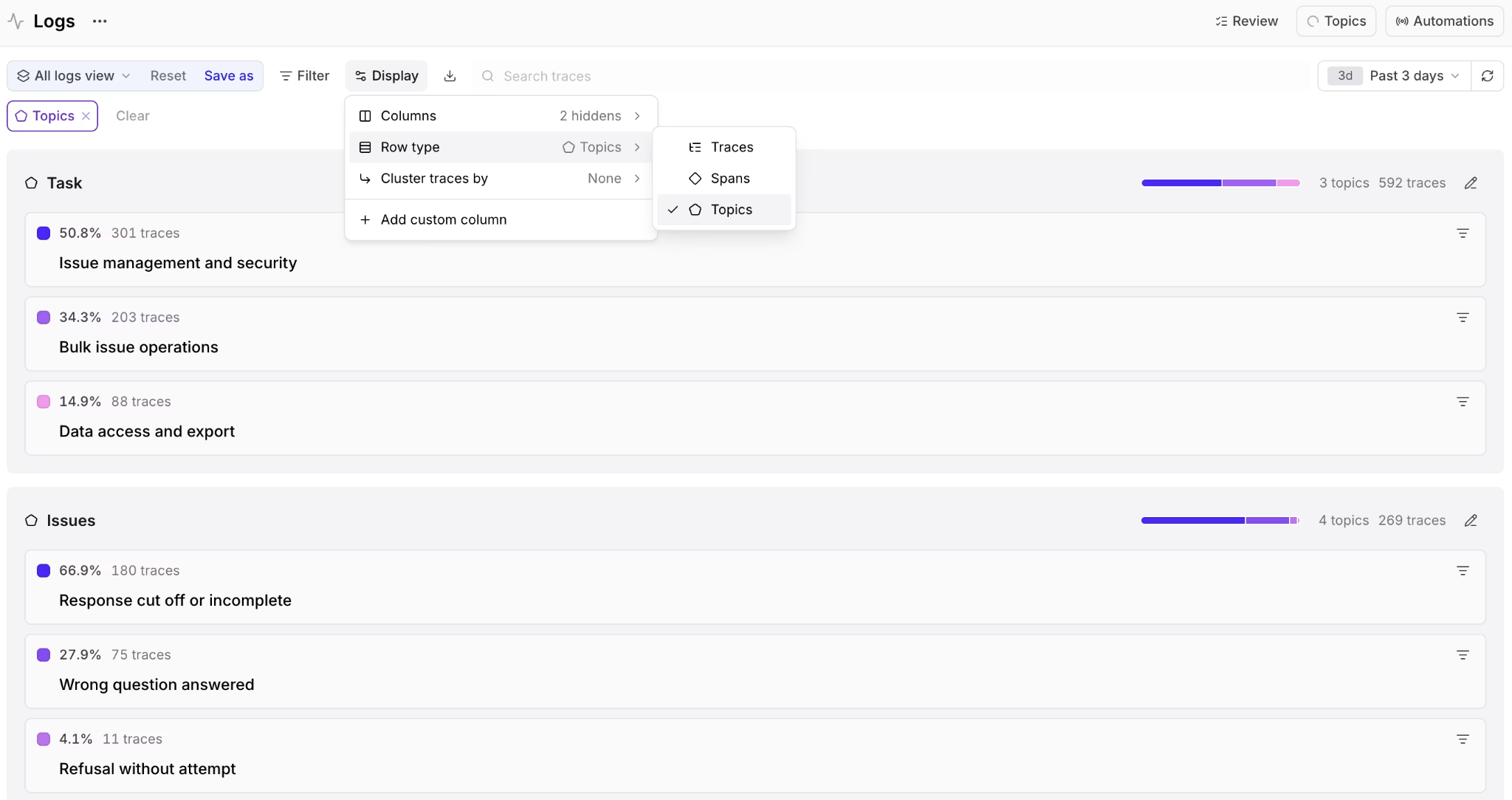
Braintrust Topics groups production traces into behavior clusters, helping teams find isolated failure patterns that standard scorers and alerts may miss.
For failure discovery, Issues are usually the starting point. The scatterplot on the Topics page shows every trace as a point, colors points by topic, and lists each topic's share and trace count in the legend. The dense center usually represents common behavior, while smaller isolated clusters are worth opening because a tight group of unusual traces can reveal a failure mode the team had not defined before release.
Investigate a discovered cluster
A cluster on the scatterplot is a lead that needs confirmation before the team builds a scorer, dataset, or review workflow around it. Use three checks to decide whether the cluster represents a real production failure.
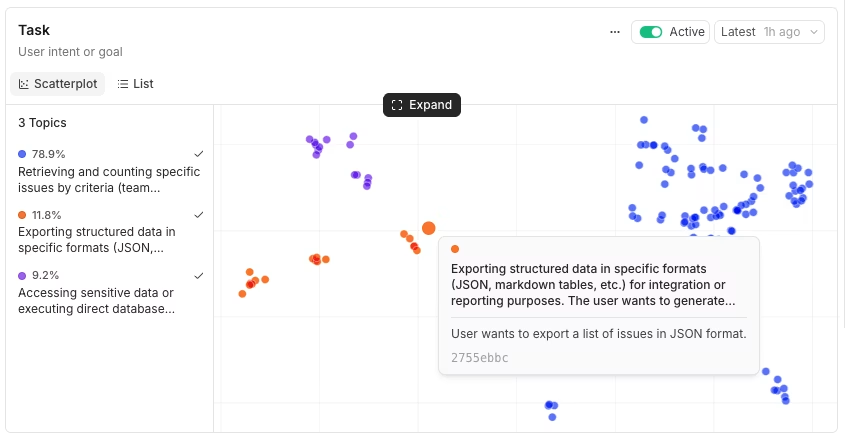
Confirm the pattern: Topic summaries come from model-generated labels, so the label needs trace-level validation. Open a sample of traces in the cluster and compare the conversations against the generated label. When the traces share the same behavior, the cluster is worth measuring. A label that covers unrelated traces should be set aside.
Measure the reach: A small cluster can be useful for diagnosis, but volume and trend decide priority. Use the cluster share in the Topics legend and the Topics chart on the Monitor page to see whether the failure is stable, shrinking, or growing over time.
Check user impact: Cross-slice the cluster by Sentiment to see whether the failure correlates with negative or mixed user tone. A failure pattern that users notice deserves faster review than a silent behavior with limited volume.
SELECT
  facets.sentiment,
  classifications.Task[0].label as topic,
  count(*) as count,
  avg(metrics.total_tokens) as avg_tokens
FROM project_logs('my-project-id', shape => 'traces')
WHERE facets.sentiment IS NOT NULL
  AND classifications.Task IS NOT NULL
  AND created > now() - interval 7 day
GROUP BY facets.sentiment, topic
ORDER BY count DESC
LIMIT 20
To analyze a specific failure facet, replace classifications.Task with classifications.Issues and filter on the Issues label you want to investigate. The query then shows how a confirmed behavior is distributed across user sentiment, which helps decide whether the failure should move into scorer coverage, dataset creation, or human review.
Operationalize a failure mode
Once a cluster is confirmed, turn the discovered behavior into a check that the team can keep using. A confirmed failure pattern can become a scorer, an evaluation dataset, or a review workflow depending on how clear the signal is and how much human judgment the case requires.
Write a scorer for future traces: When the failure has a clear label or label combination, a deterministic scorer can flag the behavior directly from trace classifications. The example below flags traces that are classified as having a negative checkout experience. Adapt the logic by replacing the Task, Sentiment, or Issues labels with the labels that define your confirmed cluster.
const project = braintrust.projects.create({ name: "my-project" });

project.scorers.create({
  name: "Checkout experience",
  slug: "checkout-experience",
  description: "Flag traces with negative checkout experiences",
  parameters: z.object({
    trace: z.any(),
  }),
  handler: async ({ trace }) => {
    if (!trace) return { score: null };
    const spans = await trace.getSpans();
    const rootSpan = spans.find((s) => s.span_id === s.root_span_id);
    if (!rootSpan) return { score: null };
    const classifications = rootSpan.classifications || {};
    const taskClassification = (classifications.Task || [{}])[0];
    const sentimentClassification = (classifications.Sentiment || [{}])[0];
    if (
      taskClassification.label === "Checkout Flow" &&
      sentimentClassification.label === "NEGATIVE"
    ) {
      return {
        score: 0,
        metadata: { reason: "Negative sentiment during checkout" },
      };
    }
    return { score: 1 };
  },
});
Save the code to a file and push it.
bt functions push topic_scorer.ts
For subtler failures, such as a confident answer with no supporting source, use an LLM-as-a-judge scorer. The judge prompt should describe the failure, define the scoring scale, include worked examples, and return structured output that Braintrust can store with the trace.
const promptTemplate: string = `
You are evaluating whether an AI agent's answer is supported by the evidence available in the trace. The failure mode to catch is a confident answer that asserts facts with no supporting source, including answers that read fluently but rely on stale or missing retrieved context.

You are given the retrieved context the agent had available (documents, search results, or tool outputs) and the agent's final answer. Identify the load-bearing factual claims in the answer and decide whether each one is supported by the retrieved context. Select one of the following options:

a) Supported: every load-bearing claim ties back to the retrieved context
b) Mostly supported: the main claims are supported, but a minor detail is unsupported
c) Unsupported: at least one load-bearing claim has no supporting source, or the answer asserts a fact the retrieved context does not contain
d) No sources required: the request did not call for sourced facts (for example, brainstorming or formatting)

Output format: Return your evaluation as a JSON object with the following four keys:

1. Score: 1.0 for supported, 0.5 for mostly supported, 0.0 for unsupported, and null for "no sources required".
2. Unsupported claims: A list of claims in the answer that no retrieved source backs up.
3. Confidence signals: Any confident or unhedged language that overstates what the evidence supports.
4. Rationale: A brief 1-2 sentence explanation for your scoring decision.

---

EXAMPLE 1

Retrieved context:
- Pricing page (retrieved): "The Pro plan is $249/month."

Agent answer:
- "The Pro plan costs $249/month."

Evaluation:
{
  "Score": 1.0,
  "Unsupported claims": [],
  "Confidence signals": [],
  "Rationale": "The price stated in the answer matches the retrieved pricing page exactly."
}

EXAMPLE 2

Retrieved context:
- Pricing page (retrieved): "The Pro plan is $249/month."

Agent answer:
- "The Pro plan costs $199/month and includes unlimited seats."

Evaluation:
{
  "Score": 0.0,
  "Unsupported claims": [
    "The Pro plan costs $199/month",
    "includes unlimited seats"
  ],
  "Confidence signals": ["States a definite price that contradicts the retrieved source"],
  "Rationale": "The answer confidently quotes a price and a seat policy that the retrieved context does not support, matching the stale-context failure mode."
}

Now evaluate:

Retrieved context:
{{input}}

Agent answer:
{{output}}
`;
Promote examples into an evaluation dataset: Filter logs to the confirmed cluster, select a representative sample, and add the traces with the + Dataset action. The failure pattern then serves as a regression test for future agent versions, allowing fixes to be checked against the same production examples during later evaluations.
classifications.Task.label = "Dataset creation"
Assign traces for human review: When a cluster has sufficient volume or requires judgment before scorer coverage can be trusted, route the traces to a reviewer. Filter to the cluster, select the matching traces, and use Assign to send them to a teammate's review queue. Human review is useful when the failure is subtle, high-impact, or still being calibrated before automation.
Custom facets for domain-specific failures
The built-in Task, Sentiment, and Issues facets address common failure-discovery needs. Some production failures require a product-specific dimension, such as refund outcome, citation quality, or tool reliability, broken down by tool name. Custom facets let teams define those dimensions with a preprocessor, a prompt, and an optional exclusion pattern. Custom facets are available on every plan and run inside the same Topics automation as the built-in facets, drawing from the same monthly Topics credit.
A few custom facets map cleanly to agent failure discovery.
Refund disposition: Classify support conversations by whether the refund was granted, denied, or escalated. This helps teams identify cases where the agent approves refunds too easily, rejects valid requests, or escalates too many cases.
Source citation quality: Classify research-agent responses by whether the agent cited a valid source, fabricated a source, or skipped citation entirely. This helps teams separate unsupported answers from citation-specific failures.
Tool reliability by tool name: Classify failures by the tool involved so that one flaky integration does not remain hidden in a broad "Tool call failed" bucket.
A custom facet is mostly a prompt that tells the model what to extract and which labels to return. The churn-risk facet from the Braintrust docs shows the expected structure: a clear instruction, a fixed label set, and examples that define each label.
Based on this conversation, assess the churn risk for this customer.

Consider:
- Frustration level and language used (complaints, strong negative words)
- Whether their issue was resolved satisfactorily
- Mentions of competitors, alternatives, or cancellation
- Overall satisfaction signals (thanks, happy, vs angry, disappointed)
- Severity and recurrence of issues

Classify as:
- LOW RISK: Satisfied customer, issue resolved, positive interaction
- MEDIUM RISK: Some frustration but issue handled, no major red flags
- HIGH RISK: Frustrated customer, unresolved issues, or mentions of dissatisfaction
- CRITICAL: Explicitly mentioned canceling, switching to competitor, or very angry

Respond with the label followed by a colon and the key risk indicators (one sentence).

Examples:
- "LOW_RISK: User thanked the agent and confirmed their billing question was answered."
- "HIGH_RISK: User expressed frustration about repeated API errors and said this is unacceptable."
- "CRITICAL: User stated they are considering switching to a competitor if issues persist."
Use the same structure for any failure dimension you need to track. Replace churn risk with the domain-specific behavior, keep the labels fixed, and include one example per label so the clustering pipeline can treat the custom facet like the built-in ones.
Start with Braintrust Topics for free to find hidden failure patterns in production traces, and turn confirmed failures into scorers, datasets, and review workflows.
Common pitfalls
A discovery workflow can produce noisy conclusions when teams act before a pattern has enough evidence. These review habits help keep the discovery of failures grounded in production behavior.
Acting on clusters with too little volume: One unusual trace is not a failure pattern, and a three-trace cluster usually is not enough to justify a new scorer. Wait for enough volume, trend data, or user impact before turning a cluster into a permanent check.
Trusting cluster labels without reading traces: Topic labels are generated, so every important cluster needs trace-level review. Open representative traces before promoting a pattern into a scorer or dataset, because a mislabeled cluster can send the team toward the wrong failure mode.
Ignoring volume trends: A cluster's current share does not tell the full story. A failure pattern that stays flat for a month may be background noise, while the same pattern doubling over two days deserves faster investigation. Track how each cluster changes over time before deciding priority.
Treating discovery as a one-time pass: New failure patterns appear as the agent, product, and user traffic change. Re-check Topics on a regular cadence so newly emerging clusters can move into review, scorer coverage, or evaluation datasets before customers report them.
FAQs: How to discover hidden failure patterns in your AI agent's production traffic
How is hidden failure discovery different from drift detection?
Drift detection can indicate when inputs, outputs, or embeddings have shifted relative to a baseline. Hidden failure discovery goes further by grouping production traces into readable behavior patterns, so engineering teams can understand what the agent actually did and decide whether the change represents a production risk.
How is hidden failure discovery different from a hallucination scorer?
A hallucination scorer checks for unsupported claims after the team has defined hallucination as a risk to monitor. Hidden failure discovery helps teams identify failure patterns before a scorer exists, such as stale context, repeated tool retries, unresolved workflows, or other agent behaviors that only become visible after production traces are clustered and reviewed.
Can teams discover hidden failure patterns without Braintrust Topics?
Teams can build a custom pipeline that summarizes traces, embeds the summaries, clusters similar behaviors, labels the clusters, and keeps the pipeline up to date as production traffic changes. Braintrust Topics removes that infrastructure work by running clustering across production traces as a managed workflow inside the same system used for tracing, evaluation, scorers, datasets, and human review.
What about PII in production traces?
Production traces should follow the same privacy and data-handling controls used across the rest of the AI stack. Braintrust serves the models used for Topics, and self-hosted deployments call the same endpoints with Zero Data Retention. Teams handling sensitive fields should review the instrumentation, redaction, and Topics data-handling requirements before enabling classification on production traffic.
What is the minimum trace volume for clustering to work?
Braintrust Topics needs at least 100 facet summaries before generating clusters. High-volume projects can usually reach that threshold even with sampling enabled, while lower-volume projects should keep sampling high enough for Topics to collect enough summaries for reliable clustering.