> ## Documentation Index
> Fetch the complete documentation index at: https://braintrust.dev/docs/llms.txt
> Use this file to discover all available pages before exploring further.
# LLM Eval For Text2SQL
[Contributed](https://github.com/braintrustdata/braintrust-cookbook/blob/main/examples/Text2SQL-Data/Text2SQL-Data.ipynb) by [Ankur Goyal](https://twitter.com/ankrgyl) on 2024-05-29
In this cookbook, we're going to work through a Text2SQL use case where we are starting from scratch without a nice and clean
dataset of questions, SQL queries, or expected responses. Although eval datasets are popular in academic settings, they are often
not practically available in the real world. In this case, we'll build up a dataset using some simple handwritten questions and
an LLM to generate samples based on the SQL dataset.
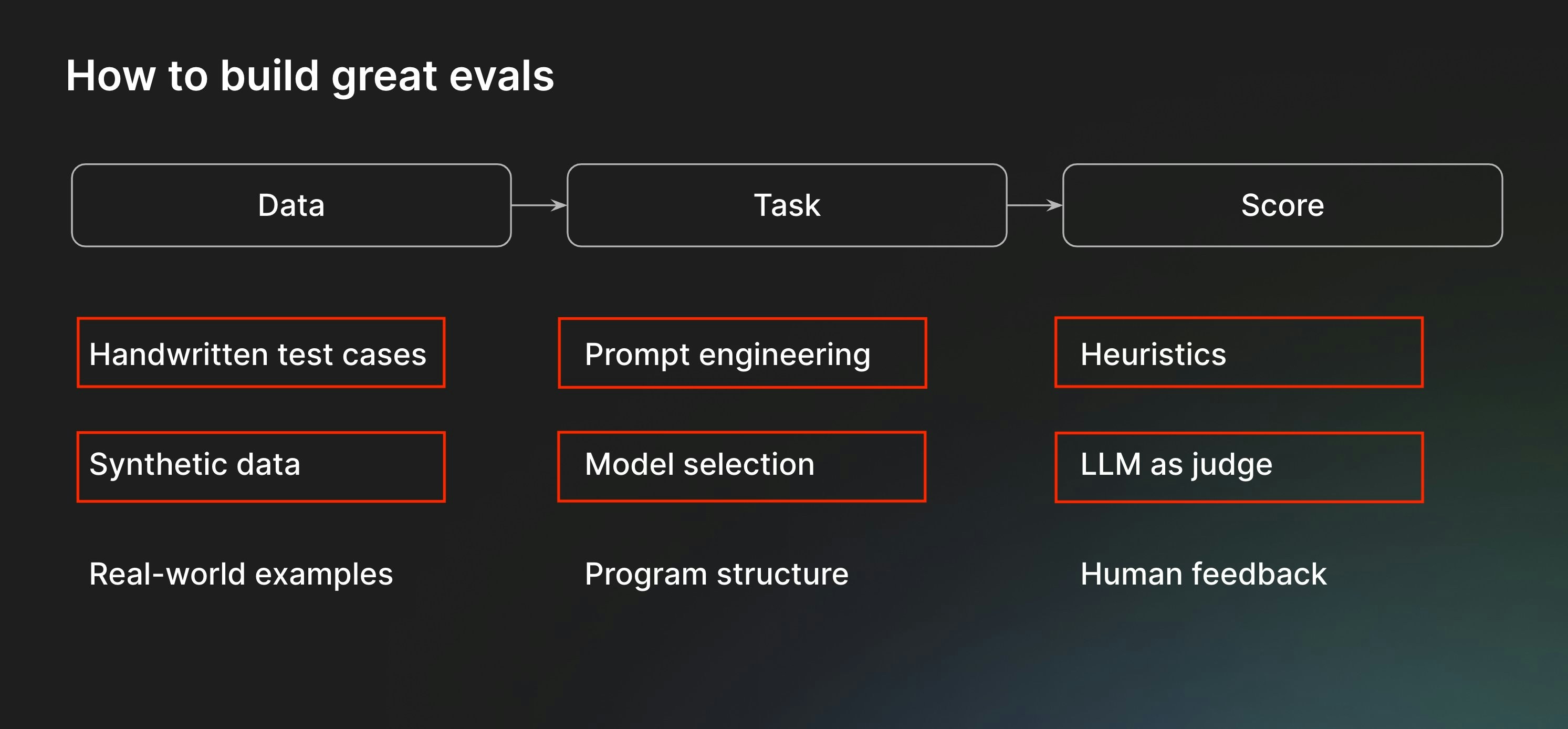
Along the way, we'll cover the following components of the eval process:
 Before starting, please make sure that you have a Braintrust account. If you do not, please [sign up](https://braintrust.dev).
## Setting up the environment
The next few commands will install some libraries and include some helper code for the text2sql application. Feel free to copy/paste/tweak/reuse this code in your own tools.
```python theme={"theme":{"light":"github-light","dark":"github-dark-dimmed"}}
%pip install -U autoevals braintrust duckdb datasets openai pyarrow pydantic --quiet
```
### Downloading the data
We're going to use an NBA dataset that includes information about games from 2014-2018. Let's start by downloading it and poking around.
We'll use [DuckDB](https://duckdb.org/) as the database, since it's easy to embed directly in the notebook.
```python theme={"theme":{"light":"github-light","dark":"github-dark-dimmed"}}
import duckdb
from datasets import load_dataset
data = load_dataset("suzyanil/nba-data")["train"]
conn = duckdb.connect(database=":memory:", read_only=False)
conn.register("nba", data.to_pandas())
conn.query("SELECT * FROM nba LIMIT 5").to_df().to_dict(orient="records")[0]
```
```
{'Unnamed: 0': 1,
'Team': 'ATL',
'Game': 1,
'Date': '10/29/14',
'Home': 'Away',
'Opponent': 'TOR',
'WINorLOSS': 'L',
'TeamPoints': 102,
'OpponentPoints': 109,
'FieldGoals': 40,
'FieldGoalsAttempted': 80,
'FieldGoals.': 0.5,
'X3PointShots': 13,
'X3PointShotsAttempted': 22,
'X3PointShots.': 0.591,
'FreeThrows': 9,
'FreeThrowsAttempted': 17,
'FreeThrows.': 0.529,
'OffRebounds': 10,
'TotalRebounds': 42,
'Assists': 26,
'Steals': 6,
'Blocks': 8,
'Turnovers': 17,
'TotalFouls': 24,
'Opp.FieldGoals': 37,
'Opp.FieldGoalsAttempted': 90,
'Opp.FieldGoals.': 0.411,
'Opp.3PointShots': 8,
'Opp.3PointShotsAttempted': 26,
'Opp.3PointShots.': 0.308,
'Opp.FreeThrows': 27,
'Opp.FreeThrowsAttempted': 33,
'Opp.FreeThrows.': 0.818,
'Opp.OffRebounds': 16,
'Opp.TotalRebounds': 48,
'Opp.Assists': 26,
'Opp.Steals': 13,
'Opp.Blocks': 9,
'Opp.Turnovers': 9,
'Opp.TotalFouls': 22}
```
## Prototyping text2sql
Now that we have the basic data in place, let's implement the text2sql logic. Don't overcomplicate it at the start. We can always improve its implementation later!
```python theme={"theme":{"light":"github-light","dark":"github-dark-dimmed"}}
import os
from textwrap import dedent
import braintrust
import openai
client = braintrust.wrap_openai(
openai.AsyncClient(
api_key=os.environ["OPENAI_API_KEY"],
base_url="https://api.braintrust.dev/v1/proxy", # This is optional and allows us to cache responses
)
)
columns = conn.query("DESCRIBE nba").to_df().to_dict(orient="records")
TASK_MODEL = "gpt-4o"
@braintrust.traced
async def generate_query(input):
response = await client.chat.completions.create(
model=TASK_MODEL,
temperature=0,
messages=[
{
"role": "system",
"content": dedent(
f"""\
You are a SQL expert, and you are given a single table named nba with the following columns:
{", ".join(column["column_name"] + ": " + column["column_type"] for column in columns)}
Write a SQL query corresponding to the user's request. Return just the query text, with no
formatting (backticks, markdown, etc.).
"""
),
},
{
"role": "user",
"content": input,
},
],
)
return response.choices[0].message.content
query = await generate_query("Who won the most games?")
print(query)
```
```
SELECT Team, COUNT(*) AS Wins
FROM nba
WHERE WINorLOSS = 'W'
GROUP BY Team
ORDER BY Wins DESC
LIMIT 1;
```
Awesome, let's try running the query!
```python theme={"theme":{"light":"github-light","dark":"github-dark-dimmed"}}
def execute_query(query):
return conn.query(query).fetchdf().to_dict(orient="records")
execute_query(query)
```
```
[{'Team': 'GSW', 'Wins': 265}]
```
## Initial evals
An `Eval()` consists of three parts — data, task, and scores. We'll start with **data**.
### Creating an initial dataset
Let's handwrite a few examples to bootstrap the dataset. It'll be a real pain, and probably brittle, to try and handwrite both questions and SQL queries/outputs. Instead,
we'll just write some questions, and try to evaluate the outputs *without an expected output*.
```python theme={"theme":{"light":"github-light","dark":"github-dark-dimmed"}}
questions = [
"Which team won the most games?",
"Which team won the most games in 2015?",
"Who led the league in 3 point shots?",
"Which team had the biggest difference in records across two consecutive years?",
"What is the average number of free throws per year?",
]
```
### Task function
Now let's write a task function. The function should take input (the question) and return output (the SQL query and results).
```python theme={"theme":{"light":"github-light","dark":"github-dark-dimmed"}}
@braintrust.traced
async def text2sql(question):
query = await generate_query(question)
results = None
error = None
try:
results = execute_query(query)
except duckdb.Error as e:
error = str(e)
return {
"query": query,
"results": results,
"error": error,
}
```
### Scores
At this point, there's not a lot we can score, but we can at least check if the SQL query is valid. If we generate an invalid query, the `error` field will be non-empty.
```python theme={"theme":{"light":"github-light","dark":"github-dark-dimmed"}}
async def no_error(output):
return output["error"] is None
```
### Eval
And that's it! Now let's plug these things together and run an eval.
```python theme={"theme":{"light":"github-light","dark":"github-dark-dimmed"}}
from braintrust import EvalAsync
PROJECT_NAME = "LLM Eval for Text2SQL"
await EvalAsync(
PROJECT_NAME,
experiment_name="Initial dataset",
data=[{"input": q} for q in questions],
task=text2sql,
scores=[no_error],
)
```
```
Experiment Initial dataset is running at https://www.braintrust.dev/app/braintrustdata.com/p/LLM%20Eval%20for%20Text2SQL/experiments/Initial%20dataset
LLM Eval for Text2SQL [experiment_name=Initial dataset] (data): 5it [00:00, 33078.11it/s]
```
```
LLM Eval for Text2SQL [experiment_name=Initial dataset] (tasks): 0%| | 0/5 [00:00
### Interpreting results
Now that we ran the initial eval, it looks like two of the results are valid, two produce SQL errors, and one is incorrect.
To best utilize these results:
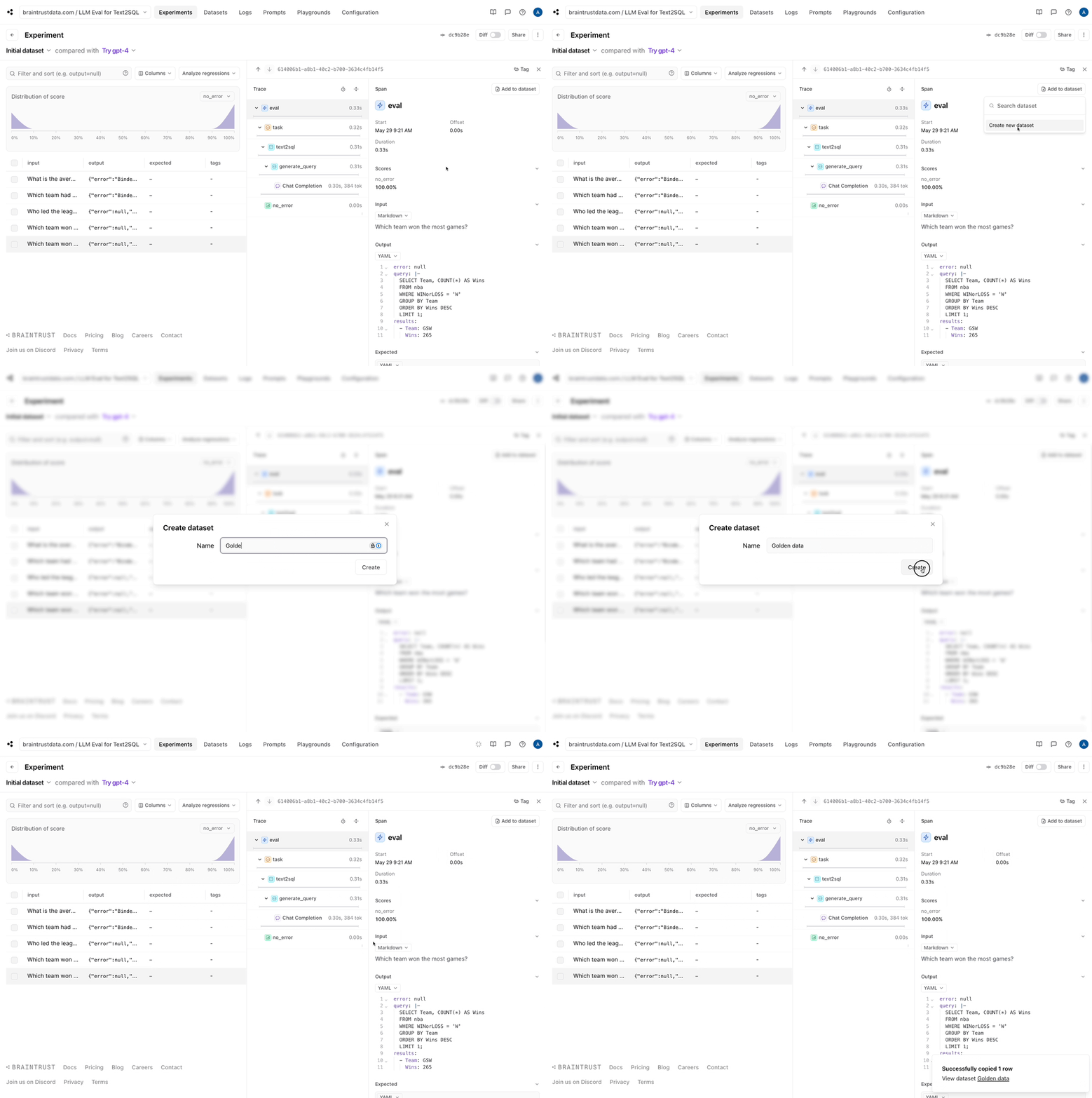
1. Let's capture the good data into a dataset. Since our eval pipeline did the hard work of generating a reference query and results, we can
now save these, and make sure that future changes we make do not *regress* the results.
Before starting, please make sure that you have a Braintrust account. If you do not, please [sign up](https://braintrust.dev).
## Setting up the environment
The next few commands will install some libraries and include some helper code for the text2sql application. Feel free to copy/paste/tweak/reuse this code in your own tools.
```python theme={"theme":{"light":"github-light","dark":"github-dark-dimmed"}}
%pip install -U autoevals braintrust duckdb datasets openai pyarrow pydantic --quiet
```
### Downloading the data
We're going to use an NBA dataset that includes information about games from 2014-2018. Let's start by downloading it and poking around.
We'll use [DuckDB](https://duckdb.org/) as the database, since it's easy to embed directly in the notebook.
```python theme={"theme":{"light":"github-light","dark":"github-dark-dimmed"}}
import duckdb
from datasets import load_dataset
data = load_dataset("suzyanil/nba-data")["train"]
conn = duckdb.connect(database=":memory:", read_only=False)
conn.register("nba", data.to_pandas())
conn.query("SELECT * FROM nba LIMIT 5").to_df().to_dict(orient="records")[0]
```
```
{'Unnamed: 0': 1,
'Team': 'ATL',
'Game': 1,
'Date': '10/29/14',
'Home': 'Away',
'Opponent': 'TOR',
'WINorLOSS': 'L',
'TeamPoints': 102,
'OpponentPoints': 109,
'FieldGoals': 40,
'FieldGoalsAttempted': 80,
'FieldGoals.': 0.5,
'X3PointShots': 13,
'X3PointShotsAttempted': 22,
'X3PointShots.': 0.591,
'FreeThrows': 9,
'FreeThrowsAttempted': 17,
'FreeThrows.': 0.529,
'OffRebounds': 10,
'TotalRebounds': 42,
'Assists': 26,
'Steals': 6,
'Blocks': 8,
'Turnovers': 17,
'TotalFouls': 24,
'Opp.FieldGoals': 37,
'Opp.FieldGoalsAttempted': 90,
'Opp.FieldGoals.': 0.411,
'Opp.3PointShots': 8,
'Opp.3PointShotsAttempted': 26,
'Opp.3PointShots.': 0.308,
'Opp.FreeThrows': 27,
'Opp.FreeThrowsAttempted': 33,
'Opp.FreeThrows.': 0.818,
'Opp.OffRebounds': 16,
'Opp.TotalRebounds': 48,
'Opp.Assists': 26,
'Opp.Steals': 13,
'Opp.Blocks': 9,
'Opp.Turnovers': 9,
'Opp.TotalFouls': 22}
```
## Prototyping text2sql
Now that we have the basic data in place, let's implement the text2sql logic. Don't overcomplicate it at the start. We can always improve its implementation later!
```python theme={"theme":{"light":"github-light","dark":"github-dark-dimmed"}}
import os
from textwrap import dedent
import braintrust
import openai
client = braintrust.wrap_openai(
openai.AsyncClient(
api_key=os.environ["OPENAI_API_KEY"],
base_url="https://api.braintrust.dev/v1/proxy", # This is optional and allows us to cache responses
)
)
columns = conn.query("DESCRIBE nba").to_df().to_dict(orient="records")
TASK_MODEL = "gpt-4o"
@braintrust.traced
async def generate_query(input):
response = await client.chat.completions.create(
model=TASK_MODEL,
temperature=0,
messages=[
{
"role": "system",
"content": dedent(
f"""\
You are a SQL expert, and you are given a single table named nba with the following columns:
{", ".join(column["column_name"] + ": " + column["column_type"] for column in columns)}
Write a SQL query corresponding to the user's request. Return just the query text, with no
formatting (backticks, markdown, etc.).
"""
),
},
{
"role": "user",
"content": input,
},
],
)
return response.choices[0].message.content
query = await generate_query("Who won the most games?")
print(query)
```
```
SELECT Team, COUNT(*) AS Wins
FROM nba
WHERE WINorLOSS = 'W'
GROUP BY Team
ORDER BY Wins DESC
LIMIT 1;
```
Awesome, let's try running the query!
```python theme={"theme":{"light":"github-light","dark":"github-dark-dimmed"}}
def execute_query(query):
return conn.query(query).fetchdf().to_dict(orient="records")
execute_query(query)
```
```
[{'Team': 'GSW', 'Wins': 265}]
```
## Initial evals
An `Eval()` consists of three parts — data, task, and scores. We'll start with **data**.
### Creating an initial dataset
Let's handwrite a few examples to bootstrap the dataset. It'll be a real pain, and probably brittle, to try and handwrite both questions and SQL queries/outputs. Instead,
we'll just write some questions, and try to evaluate the outputs *without an expected output*.
```python theme={"theme":{"light":"github-light","dark":"github-dark-dimmed"}}
questions = [
"Which team won the most games?",
"Which team won the most games in 2015?",
"Who led the league in 3 point shots?",
"Which team had the biggest difference in records across two consecutive years?",
"What is the average number of free throws per year?",
]
```
### Task function
Now let's write a task function. The function should take input (the question) and return output (the SQL query and results).
```python theme={"theme":{"light":"github-light","dark":"github-dark-dimmed"}}
@braintrust.traced
async def text2sql(question):
query = await generate_query(question)
results = None
error = None
try:
results = execute_query(query)
except duckdb.Error as e:
error = str(e)
return {
"query": query,
"results": results,
"error": error,
}
```
### Scores
At this point, there's not a lot we can score, but we can at least check if the SQL query is valid. If we generate an invalid query, the `error` field will be non-empty.
```python theme={"theme":{"light":"github-light","dark":"github-dark-dimmed"}}
async def no_error(output):
return output["error"] is None
```
### Eval
And that's it! Now let's plug these things together and run an eval.
```python theme={"theme":{"light":"github-light","dark":"github-dark-dimmed"}}
from braintrust import EvalAsync
PROJECT_NAME = "LLM Eval for Text2SQL"
await EvalAsync(
PROJECT_NAME,
experiment_name="Initial dataset",
data=[{"input": q} for q in questions],
task=text2sql,
scores=[no_error],
)
```
```
Experiment Initial dataset is running at https://www.braintrust.dev/app/braintrustdata.com/p/LLM%20Eval%20for%20Text2SQL/experiments/Initial%20dataset
LLM Eval for Text2SQL [experiment_name=Initial dataset] (data): 5it [00:00, 33078.11it/s]
```
```
LLM Eval for Text2SQL [experiment_name=Initial dataset] (tasks): 0%| | 0/5 [00:00
### Interpreting results
Now that we ran the initial eval, it looks like two of the results are valid, two produce SQL errors, and one is incorrect.
To best utilize these results:
1. Let's capture the good data into a dataset. Since our eval pipeline did the hard work of generating a reference query and results, we can
now save these, and make sure that future changes we make do not *regress* the results.
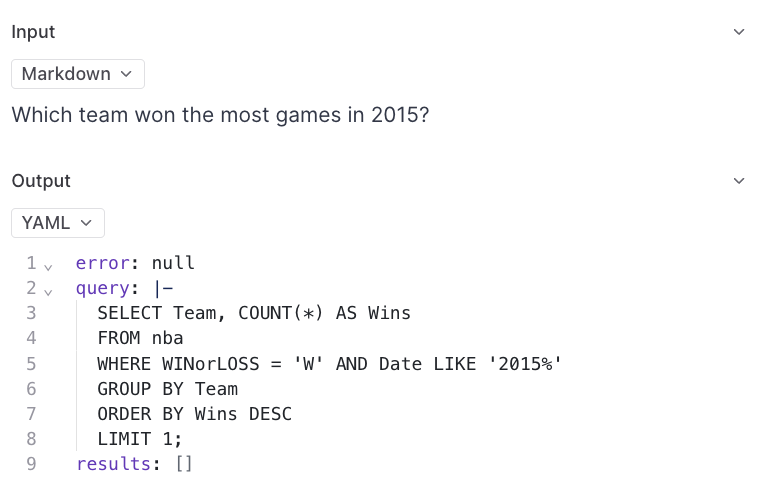
 * The incorrect query didn't seem to get the date format correct. That would probably be improved by showing a sample of the data to the model.
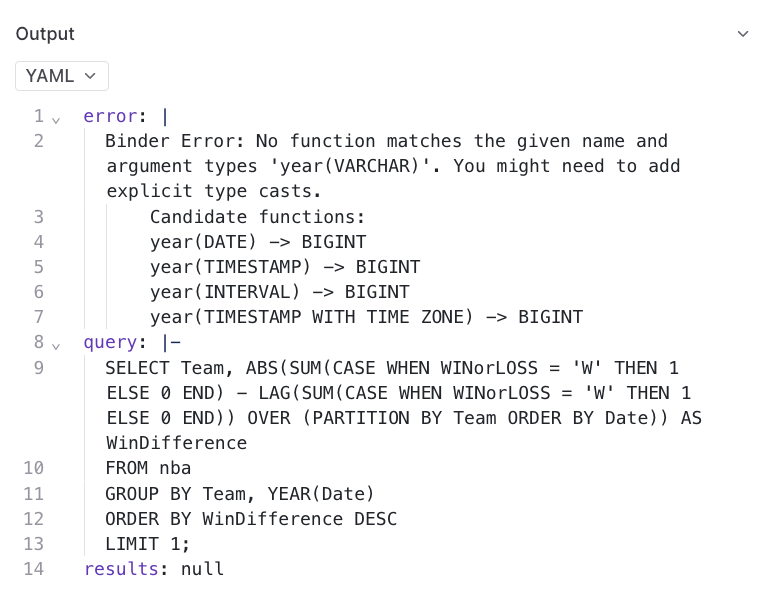
 * There are two binder errors, which may also have to do with not understanding the data format.
 ### Updating the eval
Let's start by reworking our `data` function to pull the golden data we're storing in Braintrust and extend it with the handwritten questions. Since
there may be some overlap, we automatically exclude any questions that are already in the dataset.
```python theme={"theme":{"light":"github-light","dark":"github-dark-dimmed"}}
from braintrust import init_dataset
def load_data():
golden_data = init_dataset(PROJECT_NAME, "Golden data")
golden_questions = set(d["input"] for d in golden_data)
return list(golden_data) + [
{"input": q} for q in questions if q not in golden_questions
]
load_data()[0]
```
```
{'id': '614006b1-a8b1-40c2-b700-3634c4fb14f5',
'_xact_id': '1000193117554478505',
'created': '2024-05-29 16:23:59.989+00',
'project_id': 'b8d44d19-7999-49b0-911b-1f0aaafc5bac',
'dataset_id': 'a6c337e3-f7f7-4a96-8529-05cb172f847e',
'input': 'Which team won the most games?',
'expected': {'error': None,
'query': "SELECT Team, COUNT(*) AS Wins\nFROM nba\nWHERE WINorLOSS = 'W'\nGROUP BY Team\nORDER BY Wins DESC\nLIMIT 1;",
'results': [{'Team': 'GSW', 'Wins': 265}]},
'metadata': {},
'tags': [],
'span_id': '614006b1-a8b1-40c2-b700-3634c4fb14f5',
'root_span_id': '614006b1-a8b1-40c2-b700-3634c4fb14f5'}
```
Now, let's tweak the prompt to include a sample of each row.
```python theme={"theme":{"light":"github-light","dark":"github-dark-dimmed"}}
samples = conn.query("SELECT * FROM nba LIMIT 1").to_df().to_dict(orient="records")[0]
@braintrust.traced
async def generate_query(input):
response = await client.chat.completions.create(
model=TASK_MODEL,
temperature=0,
messages=[
{
"role": "system",
"content": dedent(f"""\
You are a SQL expert, and you are given a single table named nba with the following columns:
Column | Type | Example
-------|------|--------
{"\n".join(f"{column['column_name']} | {column['column_type']} | {samples[column['column_name']]}" for column in columns)}
Write a DuckDB SQL query corresponding to the user's request. Return just the query text, with no
formatting (backticks, markdown, etc.).
"""),
},
{
"role": "user",
"content": input,
},
],
)
return response.choices[0].message.content
print(await generate_query("Which team won the most games in 2015?"))
```
```
SELECT Team, COUNT(*) AS Wins
FROM nba
WHERE WINorLOSS = 'W' AND Date LIKE '%/15'
GROUP BY Team
ORDER BY Wins DESC
LIMIT 1;
```
Looking much better! Finally, let's add a scoring function that compares the results, if they exist, with the expected results.
```python theme={"theme":{"light":"github-light","dark":"github-dark-dimmed"}}
from autoevals import JSONDiff, Sql
def extract_values(results):
return [list(result.values()) for result in results]
def correct_result(output, expected):
if (
expected is None
or expected.get("results") is None
or output.get("results") is None
):
return None
return JSONDiff()(
output=extract_values(output["results"]),
expected=extract_values(expected["results"]),
).score
def correct_sql(input, output, expected):
if expected is None or expected.get("query") is None or output.get("query") is None:
return None
return Sql()(input=input, output=output["query"], expected=expected["query"]).score
```
Great. Let's plug these pieces together and run an eval!
```python theme={"theme":{"light":"github-light","dark":"github-dark-dimmed"}}
await EvalAsync(
PROJECT_NAME,
experiment_name="With samples",
data=load_data,
task=text2sql,
scores=[no_error, correct_result, correct_sql],
)
```
```
Experiment With samples is running at https://www.braintrust.dev/app/braintrustdata.com/p/LLM%20Eval%20for%20Text2SQL/experiments/With%20samples
LLM Eval for Text2SQL [experiment_name=With samples] (data): 5it [00:00, 17848.10it/s]
```
```
LLM Eval for Text2SQL [experiment_name=With samples] (tasks): 0%| | 0/5 [00:00
Let's add the "Which team won the most games in 2015?" row to our dataset, since its answer now looks correct.
## Generating more data
Now that we have a basic flow in place, let's generate some data. We're going to use the dataset itself to generate expected queries, and have a model describe the queries.
This is a slightly more robust method than having it generate queries, because we'd expect a model to describe a query more accurately than generate one from scratch.
```python theme={"theme":{"light":"github-light","dark":"github-dark-dimmed"}}
import json
from pydantic import BaseModel
class Question(BaseModel):
sql: str
question: str
class Questions(BaseModel):
questions: list[Question]
logger = braintrust.init_logger("question generator")
response = await client.chat.completions.create(
model="gpt-4o",
temperature=0,
messages=[
{
"role": "user",
"content": dedent(f"""\
You are a SQL expert, and you are given a single table named nba with the following columns:
Column | Type | Example
-------|------|--------
{"\n".join(f"{column['column_name']} | {column['column_type']} | {samples[column['column_name']]}" for column in columns)}
Generate SQL queries that would be interesting to ask about this table. Return the SQL query as a string, as well as the
question that the query answers."""),
}
],
tools=[
{
"type": "function",
"function": {
"name": "generate_questions",
"description": "Generate SQL queries that would be interesting to ask about this table.",
"parameters": Questions.model_json_schema(),
},
}
],
tool_choice={"type": "function", "function": {"name": "generate_questions"}},
)
generated_questions = json.loads(response.choices[0].message.tool_calls[0].function.arguments)["questions"]
generated_questions[0]
```
```
{'sql': "SELECT Team, COUNT(*) as TotalGames, SUM(CASE WHEN WINorLOSS = 'W' THEN 1 ELSE 0 END) as Wins, SUM(CASE WHEN WINorLOSS = 'L' THEN 1 ELSE 0 END) as Losses FROM nba GROUP BY Team;",
'question': 'What is the total number of games played, wins, and losses for each team?'}
```
```python theme={"theme":{"light":"github-light","dark":"github-dark-dimmed"}}
generated_dataset = []
for q in generated_questions:
try:
result = execute_query(q["sql"])
generated_dataset.append(
{
"input": q["question"],
"expected": {
"results": result,
"error": None,
"query": q["sql"],
},
"metadata": {
"category": "Generated",
},
}
)
except duckdb.Error as e:
print(f"Query failed: {q['sql']}", e)
print("Skipping...")
generated_dataset[0]
```
```
Query failed: SELECT Team, AVG(FieldGoals.) as AvgFieldGoalPercentage, AVG(X3PointShots.) as Avg3PointPercentage, AVG(FreeThrows.) as AvgFreeThrowPercentage FROM nba GROUP BY Team; Parser Error: syntax error at or near ")"
Skipping...
Query failed: SELECT Team, AVG(Opp.FieldGoals.) as AvgOppFieldGoalPercentage, AVG(Opp.3PointShots.) as AvgOpp3PointPercentage, AVG(Opp.FreeThrows.) as AvgOppFreeThrowPercentage FROM nba GROUP BY Team; Parser Error: syntax error at or near ")"
Skipping...
```
```
{'input': 'What is the total number of games played, wins, and losses for each team?',
'expected': {'results': [{'Team': 'ATL',
'TotalGames': 328,
'Wins': 175.0,
'Losses': 153.0},
{'Team': 'CHI', 'TotalGames': 328, 'Wins': 160.0, 'Losses': 168.0},
{'Team': 'NYK', 'TotalGames': 328, 'Wins': 109.0, 'Losses': 219.0},
{'Team': 'POR', 'TotalGames': 328, 'Wins': 185.0, 'Losses': 143.0},
{'Team': 'DEN', 'TotalGames': 328, 'Wins': 149.0, 'Losses': 179.0},
{'Team': 'UTA', 'TotalGames': 328, 'Wins': 177.0, 'Losses': 151.0},
{'Team': 'BRK', 'TotalGames': 328, 'Wins': 107.0, 'Losses': 221.0},
{'Team': 'CHO', 'TotalGames': 328, 'Wins': 153.0, 'Losses': 175.0},
{'Team': 'DAL', 'TotalGames': 328, 'Wins': 149.0, 'Losses': 179.0},
{'Team': 'LAC', 'TotalGames': 328, 'Wins': 202.0, 'Losses': 126.0},
{'Team': 'DET', 'TotalGames': 328, 'Wins': 152.0, 'Losses': 176.0},
{'Team': 'GSW', 'TotalGames': 328, 'Wins': 265.0, 'Losses': 63.0},
{'Team': 'IND', 'TotalGames': 328, 'Wins': 173.0, 'Losses': 155.0},
{'Team': 'MIA', 'TotalGames': 328, 'Wins': 170.0, 'Losses': 158.0},
{'Team': 'MIL', 'TotalGames': 328, 'Wins': 160.0, 'Losses': 168.0},
{'Team': 'SAC', 'TotalGames': 328, 'Wins': 121.0, 'Losses': 207.0},
{'Team': 'OKC', 'TotalGames': 328, 'Wins': 195.0, 'Losses': 133.0},
{'Team': 'PHI', 'TotalGames': 328, 'Wins': 108.0, 'Losses': 220.0},
{'Team': 'PHO', 'TotalGames': 328, 'Wins': 107.0, 'Losses': 221.0},
{'Team': 'SAS', 'TotalGames': 328, 'Wins': 230.0, 'Losses': 98.0},
{'Team': 'BOS', 'TotalGames': 328, 'Wins': 196.0, 'Losses': 132.0},
{'Team': 'HOU', 'TotalGames': 328, 'Wins': 217.0, 'Losses': 111.0},
{'Team': 'LAL', 'TotalGames': 328, 'Wins': 99.0, 'Losses': 229.0},
{'Team': 'MIN', 'TotalGames': 328, 'Wins': 123.0, 'Losses': 205.0},
{'Team': 'TOR', 'TotalGames': 328, 'Wins': 215.0, 'Losses': 113.0},
{'Team': 'CLE', 'TotalGames': 328, 'Wins': 211.0, 'Losses': 117.0},
{'Team': 'MEM', 'TotalGames': 328, 'Wins': 162.0, 'Losses': 166.0},
{'Team': 'NOP', 'TotalGames': 328, 'Wins': 157.0, 'Losses': 171.0},
{'Team': 'ORL', 'TotalGames': 328, 'Wins': 114.0, 'Losses': 214.0},
{'Team': 'WAS', 'TotalGames': 328, 'Wins': 179.0, 'Losses': 149.0}],
'error': None,
'query': "SELECT Team, COUNT(*) as TotalGames, SUM(CASE WHEN WINorLOSS = 'W' THEN 1 ELSE 0 END) as Wins, SUM(CASE WHEN WINorLOSS = 'L' THEN 1 ELSE 0 END) as Losses FROM nba GROUP BY Team;"},
'metadata': {'category': 'Generated'}}
```
Awesome, let's update our dataset with the new data.
```python theme={"theme":{"light":"github-light","dark":"github-dark-dimmed"}}
def load_data():
golden_data = init_dataset(PROJECT_NAME, "Golden data")
golden_questions = set(d["input"] for d in golden_data)
return (
[{**x, "metadata": {"category": "Golden data"}} for x in golden_data]
+ [
{"input": q, "metadata": {"category": "Handwritten question"}}
for q in questions
if q not in golden_questions
]
+ [x for x in generated_dataset if x["input"] not in golden_questions]
)
```
```python theme={"theme":{"light":"github-light","dark":"github-dark-dimmed"}}
await EvalAsync(
PROJECT_NAME,
experiment_name="Generated data",
data=load_data,
task=text2sql,
scores=[no_error, correct_result, correct_sql],
)
```
```
Experiment Generated data is running at https://www.braintrust.dev/app/braintrustdata.com/p/LLM%20Eval%20for%20Text2SQL/experiments/Generated%20data
LLM Eval for Text2SQL [experiment_name=Generated data] (data): 13it [00:00, 36916.69it/s]
```
```
LLM Eval for Text2SQL [experiment_name=Generated data] (tasks): 0%| | 0/13 [00:00
Amazing! Now we have a rich dataset to work with and some failures to debug. From here, you could try to investigate whether some of the generated data needs improvement, or try tweaking the prompt to improve accuracy,
or maybe even something more adventurous, like feed the errors back to the model and have it iterate on a better query. Most importantly, we have a good workflow in place to iterate on both the application and dataset.
## Trying GPT-4
Just for fun, let's wrap things up by trying out GPT-4. All we need to do is switch the model name, and run our `Eval()` function again.
```python theme={"theme":{"light":"github-light","dark":"github-dark-dimmed"}}
TASK_MODEL = "gpt-4"
await EvalAsync(
PROJECT_NAME,
experiment_name="Try gpt-4",
data=load_data,
task=text2sql,
scores=[no_error, correct_result, correct_sql],
)
```
```
Experiment Try gpt-4 is running at https://www.braintrust.dev/app/braintrustdata.com/p/LLM%20Eval%20for%20Text2SQL/experiments/Try%20gpt-4
LLM Eval for Text2SQL [experiment_name=Try gpt-4] (data): 13it [00:00, 25491.33it/s]
```
```
LLM Eval for Text2SQL [experiment_name=Try gpt-4] (tasks): 0%| | 0/13 [00:00
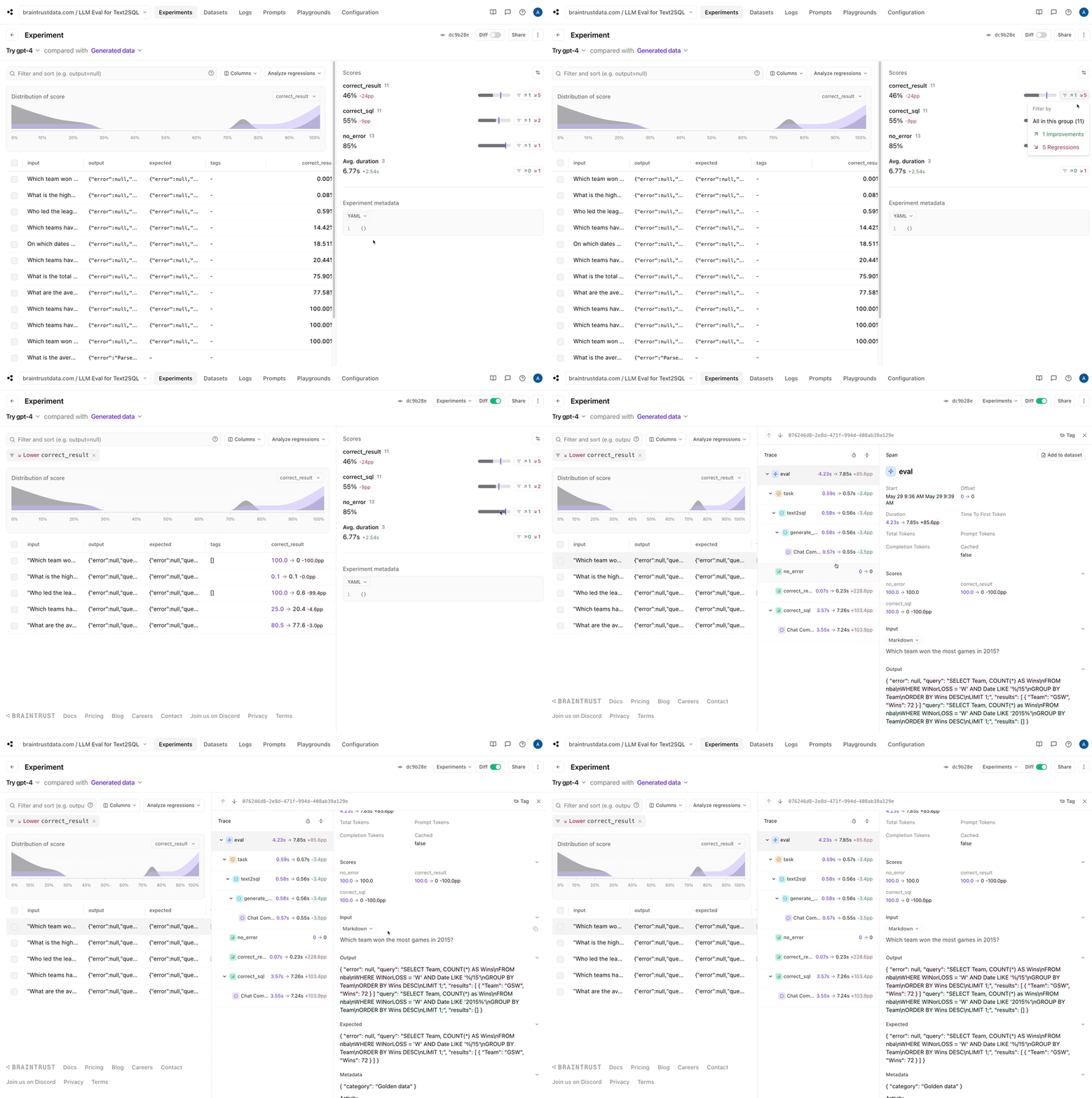
Braintrust makes it easy to filter down to the regressions, and view a side-by-side diff:
### Updating the eval
Let's start by reworking our `data` function to pull the golden data we're storing in Braintrust and extend it with the handwritten questions. Since
there may be some overlap, we automatically exclude any questions that are already in the dataset.
```python theme={"theme":{"light":"github-light","dark":"github-dark-dimmed"}}
from braintrust import init_dataset
def load_data():
golden_data = init_dataset(PROJECT_NAME, "Golden data")
golden_questions = set(d["input"] for d in golden_data)
return list(golden_data) + [
{"input": q} for q in questions if q not in golden_questions
]
load_data()[0]
```
```
{'id': '614006b1-a8b1-40c2-b700-3634c4fb14f5',
'_xact_id': '1000193117554478505',
'created': '2024-05-29 16:23:59.989+00',
'project_id': 'b8d44d19-7999-49b0-911b-1f0aaafc5bac',
'dataset_id': 'a6c337e3-f7f7-4a96-8529-05cb172f847e',
'input': 'Which team won the most games?',
'expected': {'error': None,
'query': "SELECT Team, COUNT(*) AS Wins\nFROM nba\nWHERE WINorLOSS = 'W'\nGROUP BY Team\nORDER BY Wins DESC\nLIMIT 1;",
'results': [{'Team': 'GSW', 'Wins': 265}]},
'metadata': {},
'tags': [],
'span_id': '614006b1-a8b1-40c2-b700-3634c4fb14f5',
'root_span_id': '614006b1-a8b1-40c2-b700-3634c4fb14f5'}
```
Now, let's tweak the prompt to include a sample of each row.
```python theme={"theme":{"light":"github-light","dark":"github-dark-dimmed"}}
samples = conn.query("SELECT * FROM nba LIMIT 1").to_df().to_dict(orient="records")[0]
@braintrust.traced
async def generate_query(input):
response = await client.chat.completions.create(
model=TASK_MODEL,
temperature=0,
messages=[
{
"role": "system",
"content": dedent(f"""\
You are a SQL expert, and you are given a single table named nba with the following columns:
Column | Type | Example
-------|------|--------
{"\n".join(f"{column['column_name']} | {column['column_type']} | {samples[column['column_name']]}" for column in columns)}
Write a DuckDB SQL query corresponding to the user's request. Return just the query text, with no
formatting (backticks, markdown, etc.).
"""),
},
{
"role": "user",
"content": input,
},
],
)
return response.choices[0].message.content
print(await generate_query("Which team won the most games in 2015?"))
```
```
SELECT Team, COUNT(*) AS Wins
FROM nba
WHERE WINorLOSS = 'W' AND Date LIKE '%/15'
GROUP BY Team
ORDER BY Wins DESC
LIMIT 1;
```
Looking much better! Finally, let's add a scoring function that compares the results, if they exist, with the expected results.
```python theme={"theme":{"light":"github-light","dark":"github-dark-dimmed"}}
from autoevals import JSONDiff, Sql
def extract_values(results):
return [list(result.values()) for result in results]
def correct_result(output, expected):
if (
expected is None
or expected.get("results") is None
or output.get("results") is None
):
return None
return JSONDiff()(
output=extract_values(output["results"]),
expected=extract_values(expected["results"]),
).score
def correct_sql(input, output, expected):
if expected is None or expected.get("query") is None or output.get("query") is None:
return None
return Sql()(input=input, output=output["query"], expected=expected["query"]).score
```
Great. Let's plug these pieces together and run an eval!
```python theme={"theme":{"light":"github-light","dark":"github-dark-dimmed"}}
await EvalAsync(
PROJECT_NAME,
experiment_name="With samples",
data=load_data,
task=text2sql,
scores=[no_error, correct_result, correct_sql],
)
```
```
Experiment With samples is running at https://www.braintrust.dev/app/braintrustdata.com/p/LLM%20Eval%20for%20Text2SQL/experiments/With%20samples
LLM Eval for Text2SQL [experiment_name=With samples] (data): 5it [00:00, 17848.10it/s]
```
```
LLM Eval for Text2SQL [experiment_name=With samples] (tasks): 0%| | 0/5 [00:00
Let's add the "Which team won the most games in 2015?" row to our dataset, since its answer now looks correct.
## Generating more data
Now that we have a basic flow in place, let's generate some data. We're going to use the dataset itself to generate expected queries, and have a model describe the queries.
This is a slightly more robust method than having it generate queries, because we'd expect a model to describe a query more accurately than generate one from scratch.
```python theme={"theme":{"light":"github-light","dark":"github-dark-dimmed"}}
import json
from pydantic import BaseModel
class Question(BaseModel):
sql: str
question: str
class Questions(BaseModel):
questions: list[Question]
logger = braintrust.init_logger("question generator")
response = await client.chat.completions.create(
model="gpt-4o",
temperature=0,
messages=[
{
"role": "user",
"content": dedent(f"""\
You are a SQL expert, and you are given a single table named nba with the following columns:
Column | Type | Example
-------|------|--------
{"\n".join(f"{column['column_name']} | {column['column_type']} | {samples[column['column_name']]}" for column in columns)}
Generate SQL queries that would be interesting to ask about this table. Return the SQL query as a string, as well as the
question that the query answers."""),
}
],
tools=[
{
"type": "function",
"function": {
"name": "generate_questions",
"description": "Generate SQL queries that would be interesting to ask about this table.",
"parameters": Questions.model_json_schema(),
},
}
],
tool_choice={"type": "function", "function": {"name": "generate_questions"}},
)
generated_questions = json.loads(response.choices[0].message.tool_calls[0].function.arguments)["questions"]
generated_questions[0]
```
```
{'sql': "SELECT Team, COUNT(*) as TotalGames, SUM(CASE WHEN WINorLOSS = 'W' THEN 1 ELSE 0 END) as Wins, SUM(CASE WHEN WINorLOSS = 'L' THEN 1 ELSE 0 END) as Losses FROM nba GROUP BY Team;",
'question': 'What is the total number of games played, wins, and losses for each team?'}
```
```python theme={"theme":{"light":"github-light","dark":"github-dark-dimmed"}}
generated_dataset = []
for q in generated_questions:
try:
result = execute_query(q["sql"])
generated_dataset.append(
{
"input": q["question"],
"expected": {
"results": result,
"error": None,
"query": q["sql"],
},
"metadata": {
"category": "Generated",
},
}
)
except duckdb.Error as e:
print(f"Query failed: {q['sql']}", e)
print("Skipping...")
generated_dataset[0]
```
```
Query failed: SELECT Team, AVG(FieldGoals.) as AvgFieldGoalPercentage, AVG(X3PointShots.) as Avg3PointPercentage, AVG(FreeThrows.) as AvgFreeThrowPercentage FROM nba GROUP BY Team; Parser Error: syntax error at or near ")"
Skipping...
Query failed: SELECT Team, AVG(Opp.FieldGoals.) as AvgOppFieldGoalPercentage, AVG(Opp.3PointShots.) as AvgOpp3PointPercentage, AVG(Opp.FreeThrows.) as AvgOppFreeThrowPercentage FROM nba GROUP BY Team; Parser Error: syntax error at or near ")"
Skipping...
```
```
{'input': 'What is the total number of games played, wins, and losses for each team?',
'expected': {'results': [{'Team': 'ATL',
'TotalGames': 328,
'Wins': 175.0,
'Losses': 153.0},
{'Team': 'CHI', 'TotalGames': 328, 'Wins': 160.0, 'Losses': 168.0},
{'Team': 'NYK', 'TotalGames': 328, 'Wins': 109.0, 'Losses': 219.0},
{'Team': 'POR', 'TotalGames': 328, 'Wins': 185.0, 'Losses': 143.0},
{'Team': 'DEN', 'TotalGames': 328, 'Wins': 149.0, 'Losses': 179.0},
{'Team': 'UTA', 'TotalGames': 328, 'Wins': 177.0, 'Losses': 151.0},
{'Team': 'BRK', 'TotalGames': 328, 'Wins': 107.0, 'Losses': 221.0},
{'Team': 'CHO', 'TotalGames': 328, 'Wins': 153.0, 'Losses': 175.0},
{'Team': 'DAL', 'TotalGames': 328, 'Wins': 149.0, 'Losses': 179.0},
{'Team': 'LAC', 'TotalGames': 328, 'Wins': 202.0, 'Losses': 126.0},
{'Team': 'DET', 'TotalGames': 328, 'Wins': 152.0, 'Losses': 176.0},
{'Team': 'GSW', 'TotalGames': 328, 'Wins': 265.0, 'Losses': 63.0},
{'Team': 'IND', 'TotalGames': 328, 'Wins': 173.0, 'Losses': 155.0},
{'Team': 'MIA', 'TotalGames': 328, 'Wins': 170.0, 'Losses': 158.0},
{'Team': 'MIL', 'TotalGames': 328, 'Wins': 160.0, 'Losses': 168.0},
{'Team': 'SAC', 'TotalGames': 328, 'Wins': 121.0, 'Losses': 207.0},
{'Team': 'OKC', 'TotalGames': 328, 'Wins': 195.0, 'Losses': 133.0},
{'Team': 'PHI', 'TotalGames': 328, 'Wins': 108.0, 'Losses': 220.0},
{'Team': 'PHO', 'TotalGames': 328, 'Wins': 107.0, 'Losses': 221.0},
{'Team': 'SAS', 'TotalGames': 328, 'Wins': 230.0, 'Losses': 98.0},
{'Team': 'BOS', 'TotalGames': 328, 'Wins': 196.0, 'Losses': 132.0},
{'Team': 'HOU', 'TotalGames': 328, 'Wins': 217.0, 'Losses': 111.0},
{'Team': 'LAL', 'TotalGames': 328, 'Wins': 99.0, 'Losses': 229.0},
{'Team': 'MIN', 'TotalGames': 328, 'Wins': 123.0, 'Losses': 205.0},
{'Team': 'TOR', 'TotalGames': 328, 'Wins': 215.0, 'Losses': 113.0},
{'Team': 'CLE', 'TotalGames': 328, 'Wins': 211.0, 'Losses': 117.0},
{'Team': 'MEM', 'TotalGames': 328, 'Wins': 162.0, 'Losses': 166.0},
{'Team': 'NOP', 'TotalGames': 328, 'Wins': 157.0, 'Losses': 171.0},
{'Team': 'ORL', 'TotalGames': 328, 'Wins': 114.0, 'Losses': 214.0},
{'Team': 'WAS', 'TotalGames': 328, 'Wins': 179.0, 'Losses': 149.0}],
'error': None,
'query': "SELECT Team, COUNT(*) as TotalGames, SUM(CASE WHEN WINorLOSS = 'W' THEN 1 ELSE 0 END) as Wins, SUM(CASE WHEN WINorLOSS = 'L' THEN 1 ELSE 0 END) as Losses FROM nba GROUP BY Team;"},
'metadata': {'category': 'Generated'}}
```
Awesome, let's update our dataset with the new data.
```python theme={"theme":{"light":"github-light","dark":"github-dark-dimmed"}}
def load_data():
golden_data = init_dataset(PROJECT_NAME, "Golden data")
golden_questions = set(d["input"] for d in golden_data)
return (
[{**x, "metadata": {"category": "Golden data"}} for x in golden_data]
+ [
{"input": q, "metadata": {"category": "Handwritten question"}}
for q in questions
if q not in golden_questions
]
+ [x for x in generated_dataset if x["input"] not in golden_questions]
)
```
```python theme={"theme":{"light":"github-light","dark":"github-dark-dimmed"}}
await EvalAsync(
PROJECT_NAME,
experiment_name="Generated data",
data=load_data,
task=text2sql,
scores=[no_error, correct_result, correct_sql],
)
```
```
Experiment Generated data is running at https://www.braintrust.dev/app/braintrustdata.com/p/LLM%20Eval%20for%20Text2SQL/experiments/Generated%20data
LLM Eval for Text2SQL [experiment_name=Generated data] (data): 13it [00:00, 36916.69it/s]
```
```
LLM Eval for Text2SQL [experiment_name=Generated data] (tasks): 0%| | 0/13 [00:00
Amazing! Now we have a rich dataset to work with and some failures to debug. From here, you could try to investigate whether some of the generated data needs improvement, or try tweaking the prompt to improve accuracy,
or maybe even something more adventurous, like feed the errors back to the model and have it iterate on a better query. Most importantly, we have a good workflow in place to iterate on both the application and dataset.
## Trying GPT-4
Just for fun, let's wrap things up by trying out GPT-4. All we need to do is switch the model name, and run our `Eval()` function again.
```python theme={"theme":{"light":"github-light","dark":"github-dark-dimmed"}}
TASK_MODEL = "gpt-4"
await EvalAsync(
PROJECT_NAME,
experiment_name="Try gpt-4",
data=load_data,
task=text2sql,
scores=[no_error, correct_result, correct_sql],
)
```
```
Experiment Try gpt-4 is running at https://www.braintrust.dev/app/braintrustdata.com/p/LLM%20Eval%20for%20Text2SQL/experiments/Try%20gpt-4
LLM Eval for Text2SQL [experiment_name=Try gpt-4] (data): 13it [00:00, 25491.33it/s]
```
```
LLM Eval for Text2SQL [experiment_name=Try gpt-4] (tasks): 0%| | 0/13 [00:00
Braintrust makes it easy to filter down to the regressions, and view a side-by-side diff:
 ## Conclusion
In this cookbook, we walked through the process of building a dataset for a text2sql application. We started with a few handwritten examples, and iterated on the dataset by using an LLM to generate more examples. We used the eval framework to track our progress, and iterated on the model and dataset to improve the results. Finally, we tried out a more powerful model to see if it could improve the results.
Happy evaling!
## Conclusion
In this cookbook, we walked through the process of building a dataset for a text2sql application. We started with a few handwritten examples, and iterated on the dataset by using an LLM to generate more examples. We used the eval framework to track our progress, and iterated on the model and dataset to improve the results. Finally, we tried out a more powerful model to see if it could improve the results.
Happy evaling!